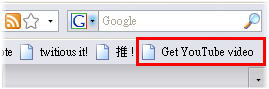
Youtube 影片的畫質越來越好,你是不是也想 將上面的影片下載到你的 手機 或是 PDA 觀看呢,現在 透過 Bookmarklet 的方式就可以輕鬆將 高畫質的影片檔 下載成 .mp4 格式的影片檔囉!
首先 到 Google Operating System 將 Get Youtube video 這個連結 拖曳到你的書籤工具列,如上圖所示,然後就大功告成了,之後在 想要下載的 Youtube 頁面中點他一下,就可以在右邊看到 Download as MP4 的字樣,按右鍵 選擇 另存連結 ...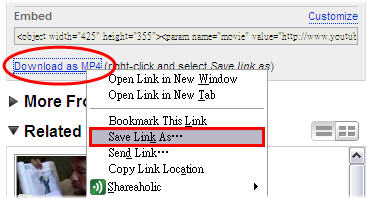
接著 把原本的 .htm 改成 .mp4 的副檔名,如下圖: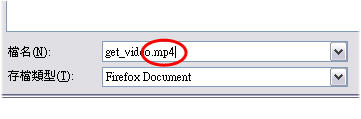
然後就大功告成了,你有想要珍藏的 Youtube 影片嗎,不妨用這個工具試試看喔!
試試看 Get Youtube video @ http://tinyurl.com/3jmboh
2008-04-14
Published 星期一, 4月 14, 2008 by Unknown with 13 comments
訂閱:
張貼留言 (Atom)


格主提供的資訊相當豐富實用,
回覆刪除只是敝人的Firefox + google
瀏覽器無法順利拖曳到工具列,
IE瀏覽器也跟其他工具列結合,
同樣無法使用,懇請賜教.
how to 將 Get Youtube video 這個連結 拖曳到你的書籤工具列
回覆刪除哈囉 關於 bookmarklet 的介紹
回覆刪除請參閱這篇唷 謝謝
http://brownywalking.blogspot.com/2009/01/firefox-useful-bookmarklets.html
有什麼問題的歡迎再跟我反應 ^^
must i use Firefox?
回覆刪除can i use IE?
IE is okay!
回覆刪除First, you must get the content of "Get Youtube video" link by right clicking mouse and selecting "Property".
Then, copy the link address in Property to any bookmark you have.
Finally, get a meaningful name for the bookmark. That'all ^^
謝謝大大的分享!
回覆刪除請問這個也能下載HQ嗎?
回覆刪除HQ 影片的話,推薦使用重灌狂人介紹的這個工具:http://bit.ly/rkVdb
回覆刪除不之啦
回覆刪除我沒半法拖曳到我的書籤ㄟ 怎麼辦 我案又見神麼都沒有
回覆刪除哈囉,基本上這個 bookmarklet 好像已經失效了!
回覆刪除您可以參考: http://3outube.com/,將網址前面的 http://www.y 改成 "3" 然後按下 Enter 也可以下載 Youtube 影片唷 ^^
must i use Firefox?
回覆刪除can i use IE?
how to 將 Get Youtube video 這個連結 拖曳到你的書籤工具列
回覆刪除